

Billing

Tuition that collects itself

Families pay automatically every Friday for the week ahead. The money goes straight to your own Stripe account, and you can see every payment from your phone or iPad.

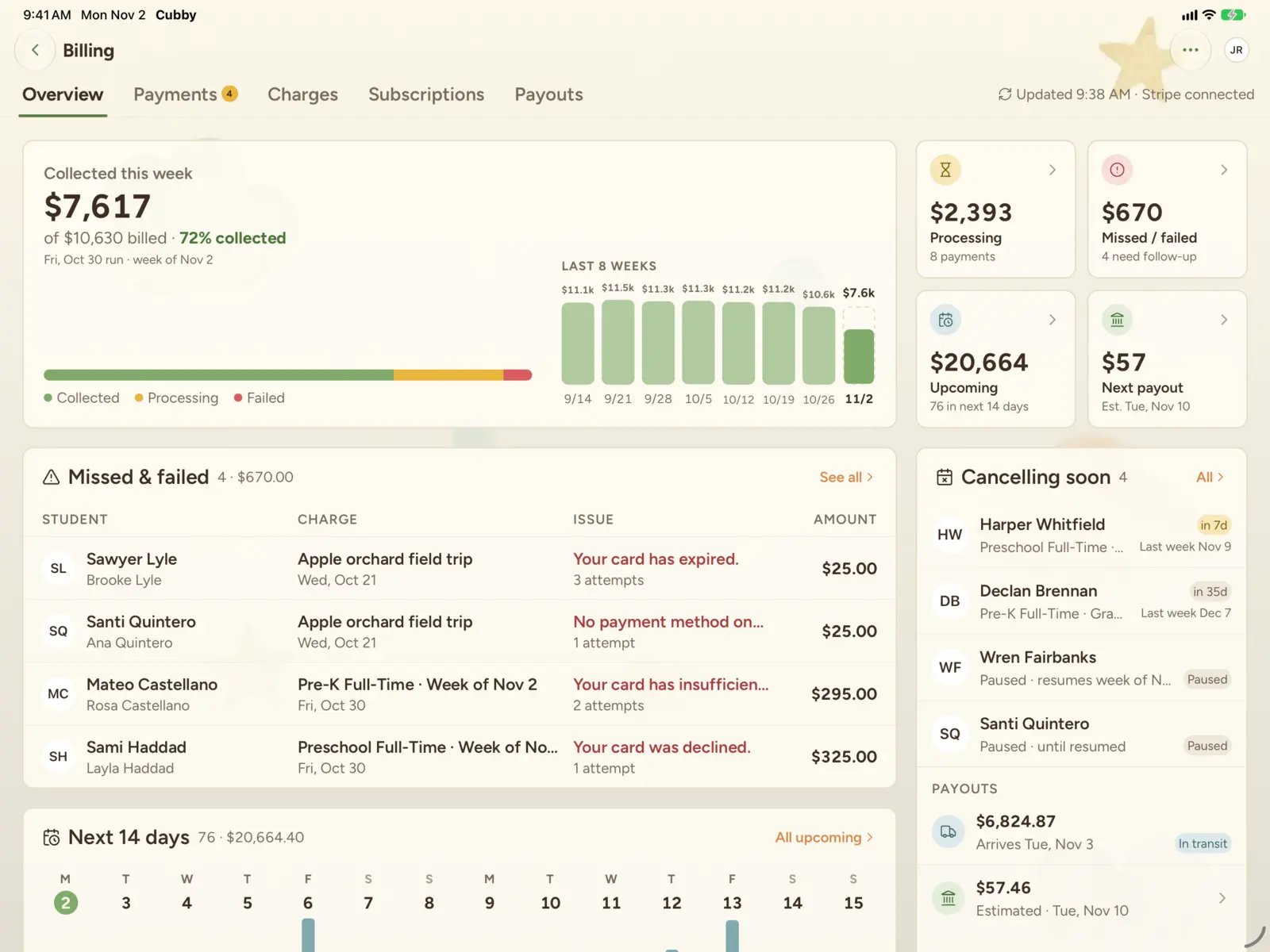
Cubby billing overview on iPad: tuition collected this week, missed and failed payments, and the next payout

How weekly autopay works

  1. Set up your Stripe account.

    Cubby creates a Stripe account in your center's name, and we'll walk you through Stripe's setup.

  2. Add each family's weekly tuition.

    Create each family's plan in your Stripe dashboard, or set them up with us. Cubby links each plan to the child and moves it onto the Friday schedule.

  3. Families add a payment method.

    Parents save a bank account or card in Stripe's secure billing portal, right from the Cubby app. Bank payments keep fees lowest.

  4. Autopay runs every Friday.

    Each Friday morning, families are charged for the care week that starts Monday. Changes, pauses and ends take effect on a Friday, so nobody pays twice and nobody gets a surprise partial week.

Friday is the default. You can change the billing schedule in your Stripe dashboard.

Autopay runs Friday morningThe care week it pays for

See who's paid without opening a spreadsheet

The billing dashboard shows this week's collections, missed and failed payments, what's due in the next 14 days and your next payout. Open any payment for the details, and export payments and payouts to CSV for your accountant.
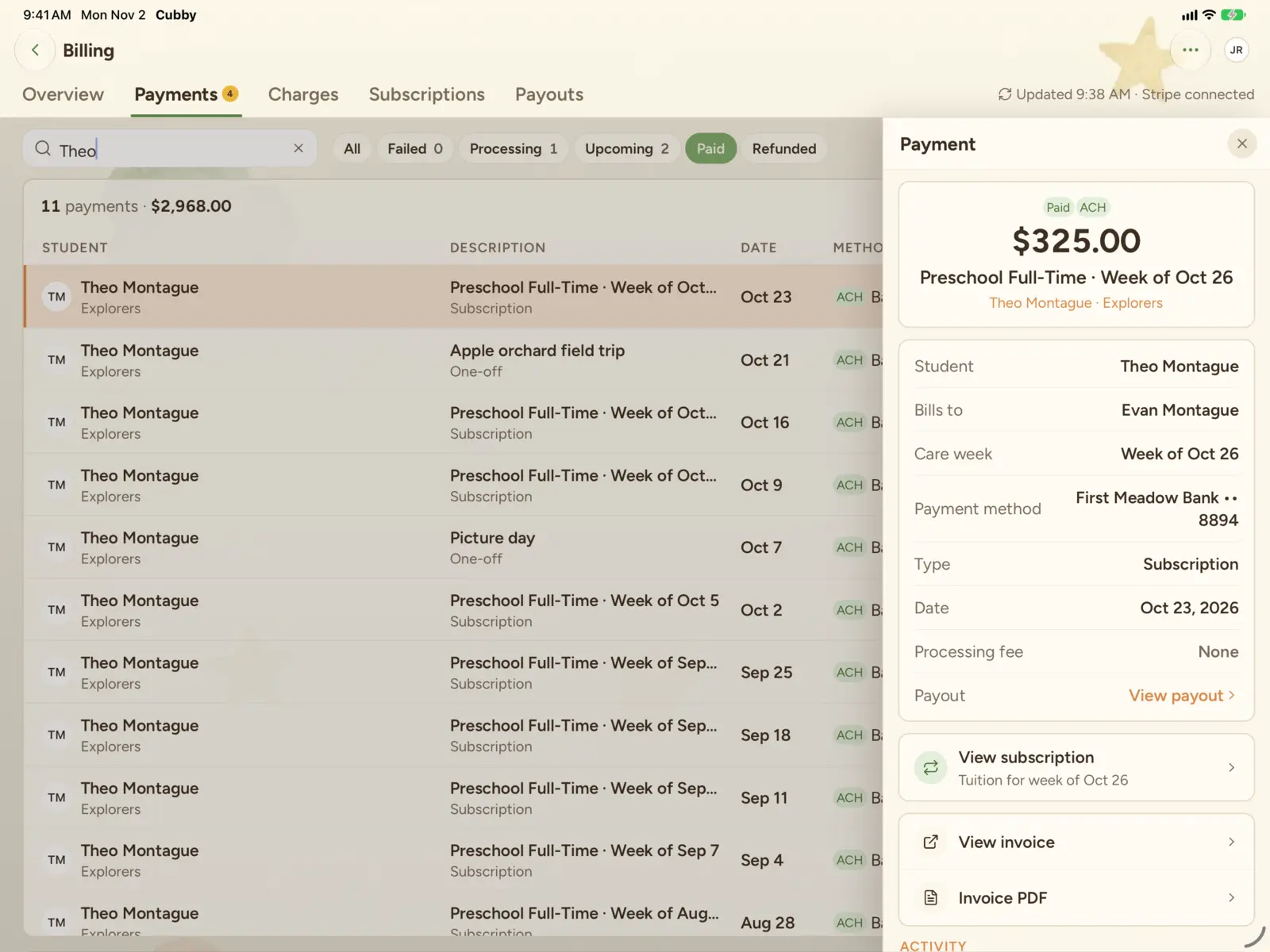

Cubby billing on iPad: one family's weekly tuition and one-off payments, with the details of one payment open
  • Overview.

    Weekly collections and the last 8 weeks at a glance.

  • Payments.

    Every payment, marked bank or card.

  • Charges.

    Every one-off charge and whether it's been paid.

  • Subscriptions.

    Each family's weekly plan, with a timeline of changes.

  • Payouts.

    What's landing in your bank and when. Visible to owners and executive directors only.

Your money never sits with us

Cubby runs on Stripe. Payments land in your center's own Stripe account and pay out to your bank on Stripe's schedule. You keep full access to your Stripe dashboard for reconciling, taxes and reporting. Card and bank details go straight to Stripe, and Cubby never sees or stores them.

  1. FamilyBank or card, saved in Stripe's billing portal
  2. StripeProcesses the payment
  3. Your center's Stripe accountIn your name, with full dashboard access
  4. Your bankOn Stripe's payout schedule

Cubby sends each Friday's charges and shows you the results. It never holds your money or sees card numbers.

Fees, field trips and everything in between

Charge a family a registration fee, a field trip or a supply fee. Cubby's fee is a flat $1 per charge, so small fees stay worth collecting.

Keep processing costs down

Bank payments cost a fraction of card payments: 0.8% up to $5, against 2.9% + 30¢. The dashboard marks which families pay which way, so you can encourage bank payments.

Questions about billing

When are families charged?
Every Friday morning, for the care week that starts the following Monday.
What happens when a payment fails?
You'll see it under Missed and failed on your dashboard. Stripe retries failed payments automatically, following the retry settings in your Stripe account.
Who can see billing?
Owners, executive directors, directors and assistant directors. Payouts are limited to owners and executive directors.
How fast do payouts reach our bank?
Stripe pays out to your bank on its standard schedule, which you control in your Stripe dashboard.
What does it cost?
2.5% of recurring tuition and $1 per one-off charge, plus Stripe's processing fees. See pricing

Let's give your center the software it deserves.

Book a 30-minute walkthrough with one of our founders. We'll show you Cubby with your classrooms in mind and answer every pricing question.